Ever wanted code that runs instantly, without servers? AWS Lambda makes it happen. Lambda is Amazon’s serverless service. Upload your code, trigger it with an event, and it runs in milliseconds. No servers to manage – just pay for the compute time you use. This guide explains Lambda in simple way: what is lambda function, how it works, and best use cases. Perfect for developers, business owners, or cloud beginners.
What is AWS Lambda Function?
AWS Lambda is a service that runs your code automatically whenever something happens – without you needing to maintain any servers.
The Real Story:
Imagine you run a photo-sharing app. Every time someone uploads a photo, you want to:
- Resize it to fit phone screens
- Save it to cloud storage
- Send a notification to their friends
Normally, you’d need servers running 24/7 waiting for uploads. Most of the time, those servers sit idle costing you money.
With Lambda, you write code once. When someone uploads a photo:
- The upload triggers your Lambda function automatically
- Lambda runs your code instantly
- Photo gets resized and saved
- Your code stops
- You pay only for those few seconds of work
No idle servers. No wasted money. No maintenance headaches.
That’s Lambda. It’s the difference between owning a car (server) and using taxi (Lambda) – you pay per trip, not for owning the vehicle.
How Does AWS Lambda Work?
Here’s we will understand how AWS Lambda works & the step-by-step journey of a Lambda function:
Step 1: Something Happens (Event Trigger)
A user uploads a photo to your app. Or clicks a button. Or sends an API request. Or a scheduled task runs at 3 AM. That’s your “event.”
Step 2: AWS Notices
AWS watches for this event. “Oh, someone just uploaded a photo! Time to run the Lambda function.”
Step 3: AWS Wakes Up Your Code
AWS finds your code and spins up a small computer (container) to run it. If it’s been used recently, it’s already warm and ready. If not, it takes 100-500 milliseconds to start (called a “cold start”).
Step 4: Your Code Runs
Your code gets the photo details, resizes it, saves it, sends notifications – whatever you programmed it to do.
Step 5: Your Code Finishes
Function completes. Result gets sent back (notification sent, photo saved, response returned to user).
Step 6: Bill Gets Calculated
AWS counts: How long did it run? How much memory did it use? They charge you maybe a fraction of a cent for this execution.
Step 7: The Container Goes to Sleep
AWS keeps your code ready for the next request (stays “warm” for about 15 minutes). If no new requests come, it shuts down.
Total time: Milliseconds. Total cost: Fractions of a cent.
That’s how Lambda works – event happens, code runs, you get billed for actual execution time.
The Architecture of a Lambda Function
To understand Lambda Architecture. Think of Lambda like a recipe. It needs five ingredients:
Handler (Your Recipe’s First Step):
This is where Lambda starts. It’s like the first instruction in a recipe: “Preheat oven to 350°F.”
Your handler receives the incoming event (what triggered it) and starts processing. Someone uploads a photo → Handler says “Got it! Let’s resize it.”
Runtime (The Kitchen):
This is the environment where your code runs. You choose a language: Python, JavaScript, Java, Go, etc. AWS provides the kitchen (the runtime environment) fully equipped and ready.
You just worry about writing the code, not setting up the kitchen.
IAM Role & Permissions (The Keys):
Think of this as giving your code permission to access things. You tell AWS: “This Lambda function can read from S3, write to the database, but cannot delete anything.”
It’s security. Without the right permissions, your code can’t do certain things.
Memory & Timeout (How Much Power & How Long):
- Memory: How powerful should the computer be? (128 MB to 10 GB). More memory = faster execution but higher cost
- Timeout: How long can it run? (1 second to 15 minutes max)
If your function takes longer than the timeout, AWS stops it. Like saying “You have 5 minutes to cook, not more.”
Environment Variables & Layers (Configuration & Shared Tools):
- Environment Variables: Settings for your code (database URL, API keys) without hardcoding them
- Layers: Shared code used by multiple functions (like a shared toolkit instead of everyone building their own)
What Triggers AWS Lambda Functions?
Lambda doesn’t run randomly. It needs a reason. Here are common “triggers” (things that make Lambda run):
When Someone Interacts:
- API call (website button click, mobile app request)
- File upload (S3 bucket)
- Database change (DynamoDB)
- Message arrives (SNS, SQS)
Automatic/Scheduled Triggers:
- 3 AM daily report generation
- Check something every hour
- Clean up old files
Real Examples:
- E-commerce site: Customer buys item → Lambda sends confirmation email
- Photo app: User uploads photo → Lambda creates thumbnail
- Social media: New post → Lambda analyzes sentiment
- Bank: Suspicious transaction detected → Lambda triggers fraud alert
AWS supports 200+ services as triggers. When any of them do something, your code runs.
Supported Programming Languages
You can write Lambda functions in whatever language you’re comfortable with:
Main Languages it supports:
- Python (popular for beginners and data science)
- JavaScript/Node.js (if you know web development)
- Java (for enterprise applications)
- Go (for high performance)
- .NET (Microsoft ecosystem)
- Ruby (if you prefer it)
- PowerShell (Windows automation)
New or Custom Languages?
If your favorite language isn’t listed, AWS lets you create custom runtimes. Developers use PHP, Rust, Kotlin, and others this way.
Pick What You Know: Choose the language you’re comfortable with. Performance differences are minimal for most use cases.
What is the use of Lambda function in AWS?
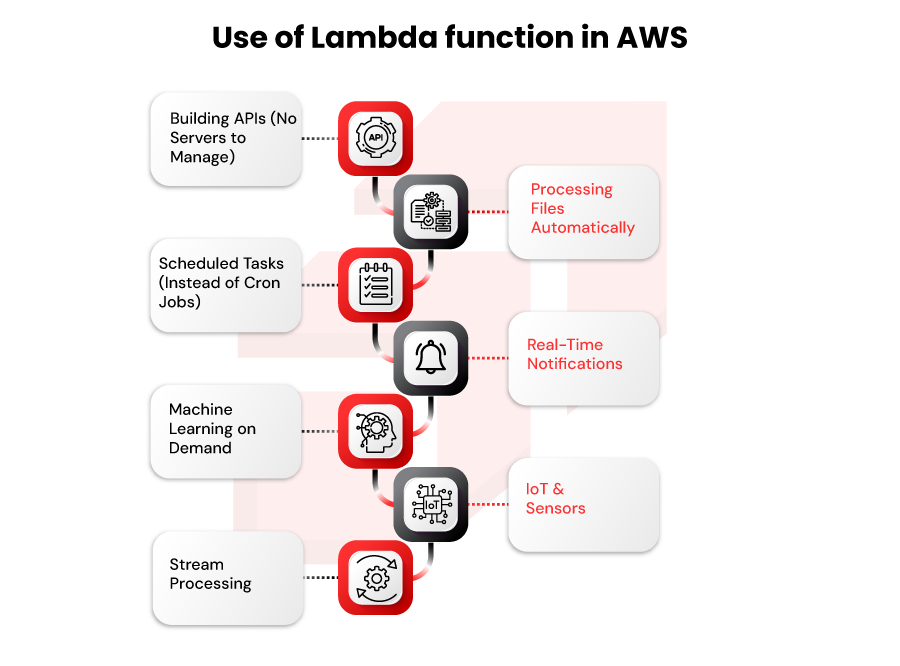
Where does Lambda actually shine? Here are real-world examples:
- Building APIs (No Servers to Manage)
Every startup building a mobile app relies on Lambda. Your phone sends a request → Lambda responds instantly → you pay fractions of a cent.
Examples: Food delivery apps, ride-sharing, banking apps, SaaS platforms.
- Processing Files Automatically
Someone uploads a document → Lambda converts it to PDF → saves to cloud → notifiesusers.
Examples: Resume parsing, invoice processing, image resizing, document conversion.
- Scheduled Tasks (Instead of Cron Jobs)
Run code at specific times withoutmaintaining a server.
Examples: Send daily digests, clean up databases, generate reports at 3 AM, backup data.
- Real-Time Notifications
Something happens → Lambda instantly sends SMS, email, push notification.
Examples: Order shipped → customer gets SMS. Payment failed → admin gets alert. User joined → welcome email sent.
- Machine Learning on Demand
Run ML models withoutmaintaining GPU servers.
Examples: Classify images, detect fraud, predict customer churn, recommend products.
- IoT & Sensors
Millions of devices sending data → Lambda processes instantly.
Examples: Temperature sensor triggers alert if too hot. Traffic sensor counts cars. Smart home devices automate actions.
- Stream Processing
Handle continuous data streams in real-time.
Examples: Stock price changes trigger Lambda to update dashboards. Social media feed processes tweets in real-time.
Real Talk: If it’s event-driven and doesn’t take forever, Lambda probably handles it well.
Pros and Cons of AWS Lambda
Why Lambda is Awesome (Pros):
- No Servers to Manage
No patching, no upgrades, no “the server is down” calls at 2 AM. AWS handles everything. - Ultra-Low Pricing
You pay per millisecond of actual usage. A function running 100ms costs about $0.0000024. Free tier covers 1 million requests/month – enough for side projects. - Scales Automatically
One request or 10,000 simultaneous requests? Lambda handles both without you doing anything. - Get to Market Fast
Write code → Upload → Done. No infrastructure setup.New ideas launch in hours. - Works With Everything
S3 uploads, database changes, API calls, scheduled tasks- Lambda connects to 200+ AWS services out of the box.
The Challenges (Cons):
- Cold Starts Exist
First-time invocation (or after sitting idle) takes 100-500 milliseconds to start. For super-fast APIs, this matters. - 15-Minute Limit
Lambdacan’t run longer than 15 minutes. Long-running processes need a different service (like Fargate). - No Local Storage
Your codecan’t save files permanently on the “server.” Everything needs cloud storage (S3, database). - Limited Customization
Youcan’t install random software packages or tweak the operating system. Limited to what AWS provides. - Vendor Lock-In
Your code becomes AWS-specific. Moving to another cloud provider later is painful.
Honest Take: For most use cases, the pros far outweigh the cons.
Best Practices for Using AWS Lambda
Here’s how to avoid common mistakes:
1.Optimize Function Size & Dependency Packages:
Don’t include 50 MB of libraries if you only need 2 MB. Smaller code = faster start.
2.Manage Cold Starts (Provisioned Concurrency):
- If cold starts bother you, pay extra for “always warm” servers ($0.015/hour)
- Or accept 200ms delays for most cases
- Use newer, faster languages (Go > Python > Java)
3.Use Environment Variables Securely:
Never hardcode passwords or API keys in your code. Use AWS Secrets Manager.
4.Choose Right Memory for Performance:
More memory = faster CPU, usually runs quicker, sometimes CHEAPER overall.
Test different memory settings to find the sweet spot.
Additional Best Practices:
- Set reasonable timeouts (not 15 minutes for everything)
- Handle errors gracefully
- Don’t create databases inside functions
- Use layers for shared code
- Monitor with CloudWatch to see what’s happening
- Set alarms for errors
When Should You Use AWS Lambda? (Summary Guidance)
Perfect For Lambda:
- API for your mobile app
- Processing file uploads
- Sending notifications
- Scheduled tasks
- Chatbots and automations
- Medium-traffic websites
- Data processing jobs under 15 minutes
NOT Good For Lambda:
- Video rendering (takes forever – exceeds 15 minutes)
- Real-time multiplayer games (latency matters)
- Always-on servers (use EC2 instead)
- Complex databases (use RDS)
- 24/7 background workers (use Fargate)
Conclusion
AWS Lambda is powerful because it’s simple. Write code, upload it, forget about servers, pay fractions of a cent.
You don’t need to be a cloud expert to use Lambda. You need basic coding skills and understanding of when to use it (event-driven, quick tasks).
Start small. Build a simple function. See how it works. Scale up when you understand it.
Expert Insight from Rapyder:
“Working with 50+ companies, we’ve noticed teams often use Lambda for everything, then realize some tasks need different tools. A hybrid approach – Lambda for events, Fargate for background jobs – usually saves 40-60% in costs”.
Why Rapyder Helps with Lambda & Serverless?
The Common Problem:
Teams launch Lambda functions without optimization. They end up paying more, struggling with cold starts, or hitting the 15-minute limit.
Rapyder’s Real Example:
One fintech company had 50 Lambda functions running inefficiently. Memory was set wrong, functions ran longer than needed, costs were high. As an AWS Premier Consulting Partner, Rapyder optimized configurations:
Results:
- $500/month in savings
- 60% faster execution
- Eliminated cold start issues
- Proper memory sizing reduced costs and improved performance
How Can We Help:
- Design efficient Lambda architectures
- Reduce costs through optimization
- Fix cold start issues
- Choose between Lambda, Fargate, or a mix
- Implement security best practices
The Value: Most organizations leave 30-50% of potential savings on the table by not optimizing Lambda properly. A simple audit often reveals quick wins.
Want similar results? A quick review can show optimization opportunities in your Lambda setup. Schedule Your Free Lambda Optimization Review.