Cloud environments in 2026 are more complex than ever. Organisations no longer operate in a single cloud. They run workloads across AWS, Azure, GCP, Kubernetes, and hybrid environments – all at the same time. This flexibility drives speed and scale, but it also multiplies moving parts.
And when complexity grows faster than visibility, risk quietly slips in. Every platform you add increases the surface area, new controls, new permissions, and new rules to manage. And as that surface expands, so do the opportunities for gaps to appear. What was once manageable now demands constant clarity and control.
In 2026, the challenge isn’t adopting the cloud. It’s staying in control as the cloud keeps expanding.
Do you know? 99% of cloud security failures stem from customer misconfigurations, not provider failures. And when breaches do happen, they cost an average of $4.44 million.
This is where cloud security tools become non-negotiable. They automate threat detection, enforce compliance, monitor configurations, and protect workloads 24/7. This guide covers:
- What are cloud security tools?
- Why Cloud Security Tools Are Critical in 2026
- Top 20 Cloud Security Tools for 2026: Free & Open Source Tools
- How to Choose the Right Cloud Security Tool
- Simplify Cloud Security Complexity with Rapyder
What Are Cloud Security Tools?
Cloud security tools are software solutions designed to protect cloud environments from misconfigurations, vulnerabilities, threats, and unauthorized access. Unlike traditional security tools, cloud security tools understand the shared responsibility model. Cloud providers manage infrastructure security, but you’re responsible for application, data, and identity security.
The Four Protection Layers:
- Infrastructure Security:Protectscompute, networks, and storage.
Example: Detecting open S3 buckets exposing data publicly. - Application Security:Secures code, APIs, and microservices.
Example: Scanning for hardcoded secrets. - Data Security:Encrypts data and prevents unauthorized access.
Example: Ensuring databases have encryption enabled. - Identity Security:Controls access through IAM roles and permissions.
Example: Detecting overly permissive policies.
Why Cloud Security Tools Are Critical in 2026
- Explosion of Attack Surface: Organizations juggle hundreds or thousands of cloud resources. Each misconfigured resource is an entry point. Misconfigurations cause 23% of cloud security incidents. Manual reviewscan’t scale so, you need automated monitoring.
- Compliance Complexity:HIPAA, PCI-DSS, GDPR, SOC 2 requirements demand continuous audits. Cloud security tools audit against compliance frameworks (CIS, NIST, GDPR) automatically and generate reports, eliminating manual nightmares.
- Multi-Cloud Chaos:Organizations use AWS, Azure, GCP, and on-premises simultaneously. A single misconfigured resource in GCP can compromise your entire network. Tools like Prowler support all major clouds from one dashboard.
- Insider Threats & Human Error:96% of organizations face challenges with cloud implementation. Developers hardcode secrets, insiders misconfigure permissions, contractors leave databases open, these human errors cause most breaches. Tools catch these before exploitation.
- Rapid Threat Evolution:New vulnerabilities emerge daily. Zero-day exploits appear without warning. Cloud security tools use AI and threat intelligence to detect unknown threats and respond automatically, reducing breach costs by up to $2 million compared to manual approaches.
Key Categories of Cloud Security Tools
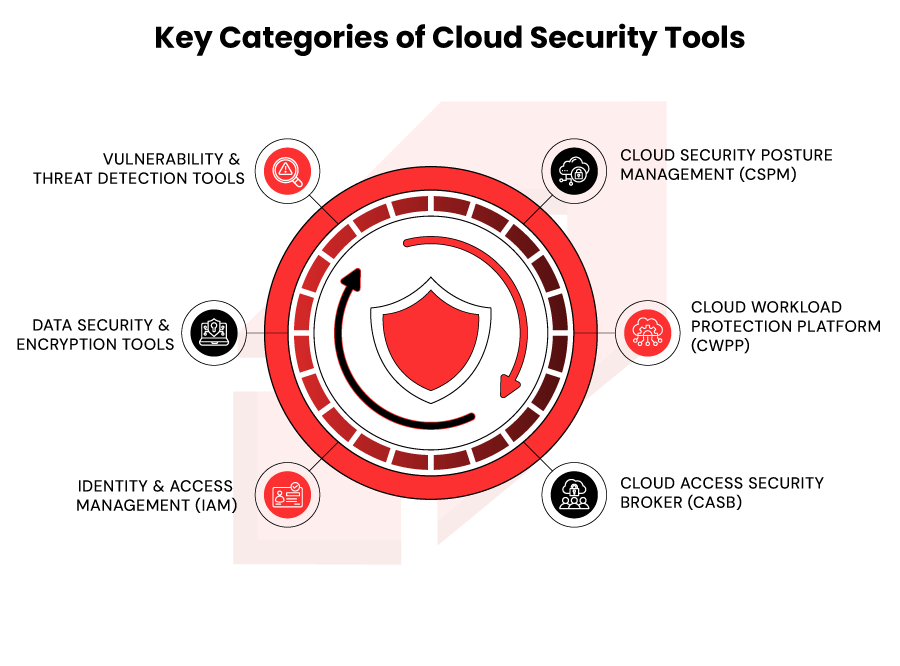
- Cloud Security Posture Management (CSPM): Discovers cloud assets, audits configurations, identifies misconfigurations and compliance gaps, prioritizes remediation.
Examples: Wiz, Prisma Cloud, Orca Security.
- Cloud Workload Protection Platform (CWPP): Protects running applications and containers, monitors runtime behavior, detects anomalies, blocks suspicious activity.
Examples: Aqua Security, AccuKnox, CrowdStrike Falcon.
- Cloud Access Security Broker (CASB): Controls cloud application access, monitors user behavior, prevents data exfiltration, enforces security policies.
Examples: Zscaler, Netskope.
- Identity & Access Management (IAM): Manages user identities, enforces authentication/authorization, detects privilege escalation, ensures least-privilege access.
Examples: HashiCorp Vault, AWS IAM, Azure AD.
- Data Security & Encryption Tools: Encrypts data at rest/in transit, prevents unauthorized access, enforces data classification.
Examples: AWS KMS, Azure Key Vault, CloudFlare.
- Vulnerability & Threat Detection Tools: Scans for vulnerabilities, detects active threats, correlates threat intelligence.
Examples: Snyk, Lacework, Check Point CloudGuard.
Top 20 Cloud Security Tools for 2026: Free & Open-Source Tools
Free Cloud Security Tools
1) Prowler
What it does: Open‑source multi‑cloud security assessment tool that runs hundreds of checks against CIS, NIST, PCI-DSS and other benchmarks for AWS, Azure, GCP, and Kubernetes.
Best for: DevOps and security teams in multi‑cloud, compliance‑heavy SMBs and enterprises.
| Strengths | Limitations |
| Multi-cloud coverage (AWS, Azure, GCP, K8s) with 300+ predefined checks. | CLI‑first, needs engineering skills and internal hosting. |
| Strong alignment with major compliance frameworks (CIS, NIST, PCI‑DSS). | No rich built‑in UI dashboards unless you use the paid hosted version. |
2) Falco
What it does: CNCF open‑source runtime security tool that watches Linux syscalls and container/Kubernetes behavior to detect anomalies in real time.
Best for: Kubernetes and container teams that need runtime threat detection.
| Strengths | Limitations |
| Real‑time detection of abnormal host and container behavior using flexible rules. | Requires strong Linux/Kubernetes skills to tune rules and reduce noise. |
| Deep CNCF ecosystem support and integrations with SIEM and response workflows. | Focused on runtime, it does not provide CSPM or config posture scanning. |
3) Kubescape
What it does: Open‑source Kubernetes security scanner that checks clusters and manifests against CIS K8s benchmarks and best practices.
Best for: Platform/SRE teams running production Kubernetes clusters.
| Strengths | Limitations |
| Purpose‑built for K8s with CIS benchmark checks and quick cluster assessments. | Limited to Kubernetes, no visibility into non‑K8s cloud resources. |
| Works both on manifests (shift‑left) and running clusters. | Requires other tools for vulnerability scanning and identity governance. |
4) KICS
What it does: Open‑source static scanner that finds misconfigurations in Terraform, CloudFormation, Kubernetes YAML, Docker, and other IaC templates before deployment.
Best for: DevSecOps teams practicing GitOps/IaC.
| Strengths | Limitations |
| Strong multi‑framework IaC support with easy CI/CD integration. | No runtime or API‑level scanning covers only IaC code. |
| Helps “shift left” by catching issues during code review, not in production. | Custom rule writing can be non‑trivial for smaller teams. |
5) Wazuh
What it does: Open‑source SIEM and XDR platform for log collection, threat detection, compliance, and incident response across on‑prem and cloud.
Best for: Organisations building an in‑house SOC on a tight license budget.
| Strengths | Limitations |
| Combines SIEM, intrusion detection, and compliance in a single OSS stack. | Requires significant infrastructure and tuning to scale well. |
| Supports multi‑OS, containers, and major clouds with many integrations. | Needs dedicated SOC skills, out‑of‑box experience can feel heavy. |
6) HashiCorp Vault
What it does: Open‑source secrets management platform for storing and rotating credentials, tokens, and encryption keys with policy‑based access control.
Best for: Cloud‑native teams managing lots of secrets across services and environments.
| Strengths | Limitations |
| Mature, enterprise‑grade secrets lifecycle management with audit logging. | Operationally complex to deploy and maintain at scale. |
| Broad ecosystem integrations (cloud providers, databases, PKI). | Focused purely on secrets, doesn’t solve posture or threat detection. |
7) OpenSCAP
What it does: Open‑source toolkit for vulnerability and configuration assessment against compliance baselines such as NIST, PCI-DSS, HIPAA, and CIS.
Best for: Regulated industries needing repeatable compliance scans on servers/VMs.
| Strengths | Limitations |
| Strong support for formal benchmarks and machine‑readable SCAP content. | Primarily system‑level, limited awareness of cloud‑native services. |
| Generates detailed reports auditors can use directly. | No built‑in remediation workflows or orchestration. |
8) Snyk (Free Tier)
What it does: Developer‑focused platform that scans code, open‑source dependencies, containers, and IaC for vulnerabilities, with Git and CI/CD integrations.
Best for: Dev teams that want security checks inside GitHub/GitLab and pipelines.
| Strengths | Limitations |
| Excellent developer UX with pull‑request comments and quick fixes. | Free tier is usage‑capped and limited for larger teams. |
| Covers SCA, IaC, and container images from one interface. | Not a full CSPM or runtime security solution. |
9) TruffleHog
What it does: Scans git history and repos to find accidentally committed secrets like API keys and tokens.
Best for: Any team using Git that wants to prevent credential leaks.
| Strengths | Limitations |
| Very effective at uncovering secrets across deep git history. | Limited to source control, doesn’t scan cloud configs or runtime. |
| Simple to automate in CI and pre‑commit hooks. | Can produce noise if patterns aren’t tuned. |
10) Container Security Suite
What it does: Open‑source toolkit for scanning container images for vulnerabilities and configuration issues before deployment.
Best for: Teams running Docker/Kubernetes who need basic image hygiene checks.
| Strengths | Limitations |
| Focused, lightweight image and container misconfiguration scanning. | Narrow scope doesn’t cover broader cloud posture or IAM. |
| Open‑source and easy to plug into registries and CI. | Enterprise reporting and governance features are minimal. |
Paid Cloud Security Tools
1) Wiz
What it does: Agentless CNAPP/CSPM that scans AWS, Azure, GCP for misconfigurations, vulnerabilities, identities, and data risks, then correlates them into attack paths.
Best for: Mid–large enterprises, multi‑cloud environments, risk‑based security teams.
| Strengths | Limitations |
| Very strong coverage and attack‑path context with low false positives. | Premium pricing, costs can rise quickly with large workloads. |
| Fast, agentless deployment and good UX for SecOps and cloud teams. | Limited deep AppSec,often needs separate dev tooling. |
2) Prisma Cloud
What it does: Broad CNAPP combining CSPM, workload protection, IaC/code scanning, API security, and compliance across major clouds.
Best for: Large enterprises, especially those already using Palo Alto firewalls/XDR.
| Strengths | Limitations |
| Very rich feature set and 100+ compliance frameworks out of the box. | Can be complex and noisy without careful tuning. |
| Strong IaC and CI/CD integration for shift‑left security. | Heavier to implement and operate than lighter CSPM tools. |
3) Orca Security
What it does: Agentless CSPM/CNAPP using SideScanning to read disk snapshots and find vulnerabilities, malware, and secrets across cloud workloads.
Best for: AWS‑heavy shops and smaller security teams that need high‑quality findings with minimal setup.
| Strengths | Limitations |
| Very low false positive rate and clear, prioritized findings. | Feature set somewhat narrower than Wiz/Prisma for code and data. |
| SideScanning discovers secrets and issues API‑only tools can miss. | Historically stronger on AWS than on other clouds. |
4) CrowdStrike Falcon Cloud Security
What it does: Extends CrowdStrike’s EDR/XDR to protect cloud workloads with real‑time behavioral detection, automated containment, and lateral‑movement prevention.
Best for: Enterprises already on CrowdStrike, or those prioritising advanced threat detection.
| Strengths | Limitations |
| Excellent detection and response for runtime attacks and ransomware. | Weaker on cloud posture/compliance than dedicated CSPM tools. |
| Tight integration with Falcon agents and threat intel. | Per‑endpoint pricing can become expensive at large scale. |
5) Commvault
What it does: Enterprise backup and disaster recovery suite with immutable backup, air‑gapped storage, and multi‑cloud recovery features.
Best for: Large enterprises needing robust DR and ransomware‑resilient backups.
| Strengths | Limitations |
| Strong ransomware resilience via immutable and isolated backups. | Complex to size, license, and operate for smaller teams. |
| Supports hybrid and multi‑cloud DR with granular recovery options. | Focused on backup/DR, not posture or threat detection. |
6) AccuKnox CNAPP
What it does: Cloud‑native application protection with zero‑trust runtime controls for containers, Kubernetes, and serverless.
Best for: Cloud‑native teams with heavy K8s/serverless usage and zero‑trust goals.
| Strengths | Limitations |
| Strong focus on K8s/serverless runtime and zero‑trust policies. | Less mature and less widely adopted than big CNAPP vendors. |
| Good fit for DevSecOps workflows in modern app stacks. | Limited features for traditional VMs/on‑prem workloads. |
7) Aqua Security
What it does: Container and cloud workload security platform covering image scanning, runtime enforcement, supply chain security, and K8s protection.
Best for: Organisations where containers and Kubernetes are core to production.
| Strengths | Limitations |
| Deep container/K8s expertise with strong image and registry scanning. | Narrower focus on containers, needs other tools for full CSPM. |
| Good supply‑chain security features across build and deploy stages. | Can be complex to roll out in very large K8s estates. |
8) Zscaler Posture Control
What it does: CSPM + CIEM platform that discovers cloud assets and identities and enforces least‑privilege and zero‑trust access across clouds.
Best for: Organisations leading with identity‑centric or zero‑trust strategies.
| Strengths | Limitations |
| Strong focus on identity/permissions and CIEM use cases. | Less known and less feature‑rich than top CNAPP leaders. |
| Integrates well with Zscaler’s secure access stack for end‑to‑end zero trust. | Limited depth in workload/runtime protection. |
9) Microsoft Defender for Cloud
What it does: Azure‑native CSPM and workload protection suite with threat detection, compliance scoring, and connectors for AWS/GCP.
Best for: Azure‑first organisations and Microsoft‑centric environments.
| Strengths | Limitations |
| Tight integration with Azure Portal, Azure Policy & M365 ecosystem | Non‑Azure coverage (AWS/GCP) is more limited and connector‑based. |
| Offers a free CSPM baseline and relatively low entry cost | Can become complex/pricey at high scale due to per‑resource pricing. |
10) Lacework
What it does: CNAPP platform that combines CSPM, CWPP, and anomaly‑based threat detection using machine learning.
Best for: Mid‑market and enterprise teams wanting unified cloud security with behavioral analytics.
| Strengths | Limitations |
| Strong anomaly detection and behavioral models across cloud activity. | Pricing and deployment model can be complex for smaller orgs. |
| Unified view across posture, workloads, and vulnerabilities. | Less brand recognition than Wiz/Prisma in some markets. |
How to Choose the Right Cloud Security Tool
1.Multi-Cloud Support: Do you use multiple clouds (AWS, Azure, GCP) or single cloud? Tools like Wiz and Prisma Cloud support all major clouds, single-cloud tools limit flexibility.
2.Ease of Deployment: Agentless tools (Wiz, Orca) deploy in minutes via API, agent-based tools (Aqua, AccuKnox) require setup but offer deeper visibility.
3.Cost vs. Features: Prowler is free but requires technical setup. Wiz costs $24K/year but automates remediation. Calculate total cost of ownership including tool cost, setup time, training, and avoided breach costs.
4.Integration Capabilities: Does it integrate with CI/CD (GitHub, GitLab, Jenkins), SIEM (Splunk, Datadog), or ticketing systems (Jira, ServiceNow)?
5.Compliance Requirements: Do you need HIPAA, PCI-DSS, GDPR, SOC 2 certification? Verify the tool generates audit reports automatically.
6.Scalability: Small teams use Snyk (free tier) or Prowler. Mid-market fits Wiz or Orca. Enterprise needs Prisma Cloud. Plan for growth.
7.Vendor Support: Do you need 24/7 support (paid tools) or is community support enough (open source)?
Common Mistakes When Selecting Cloud Security Tools
1. Choosing Based on Buzzwords:Don’t buy tools for having “AI” or “zero-trust” without assessing your specific gaps. Start with a security audit identifying top risks, then choose tools solving YOUR problems.
2. Overlooking Integration Complexity:Best-in-class tools that don’t integrate with your ecosystem force manual data movement, defeating the purpose.
Verify integrations before purchasing:
cloud platform, CI/CD, incident response systems.
3. Not Considering Total Cost of Ownership:Comparing only tool costs ($20K vs. $40K) ignores implementation, training, and team time. A cheaper tool requiring months to deploy costs more.
Calculate:
tool cost + setup time + training + maintenance.
4. Picking Too Many Tools (Tool Sprawl):Buying separate CSPM, CWPP, CASB, IAM, data security, and threat detection tools means managing 6 dashboards. Start with one core tool, add specialized tools only when needed.
5. Ignoring Learning Curve & Team Readiness: Implementing Prowler without technical staff leaves it unused. Assess team skills, are they cloud-native? Kubernetes-experienced? Choose matching tools or allocate training time.
Simplify Cloud Security Complexity With Rapyder
Cloud security tools are powerful, but selecting and optimizing them requires expertise. Most organizations struggle with choosing between 50+ tools, implementing incorrectly, overpaying for unused features, and managing tool sprawl.
Rapyder’s Cloud Security Approach:
As an AWS Premier Consulting Partner, Rapyder helps organizations audit current environments, evaluate and select optimal tools, implement and integrate properly, set up continuous monitoring, and optimize costs by 30-40%.
Real Example: One financial services customer had 8 separate security tools with gaps and paid $150K/year. Rapyder consolidated to 3 integrated tools covering more risks and reduced costs to $85K/year, saving $65K while improving security.
Most organizations leave 30-50% of security tool investments untapped due to poor implementation. A 2-4 week engagement typically identifies $50K-100K in annual savings plus significant security improvements.
Ready to optimize your cloud security? Schedule a 1-hour assessment to identify your biggest risks and optimal tool strategy.
Get Your Free Cloud Security Assessment →
Conclusion
Cloud security tools aren’t optional in 2026, they’re essential. The average cloud breach costs $4.44 million, and 99% stem from misconfigurations. Without proper tools, you’re exposed.
Start by assessing your risks. Match tools to your needs.
Implement gradually, monitor continuously, iterate. Cloud security isn’t a destination, it’s an ongoing process.
The tools are there. The only question is: Are you using them?