Integrating LLM APIs into Existing Apps: A Real-World Cross-Cloud LLM Integration Story
1. Introduction
Most AI integration tutorials start with a blank slate – a fresh environment, a new project, and none of the complexity that comes with real production systems. This blog is different.
This is a story from two real, paid projects on cross-cloud LLM integration, where we integrated multiple Large Language Models (LLMs) into existing customer support applications running on AWS. We used Google’s Gemini, Anthropic’s Claude Sonnet, and Amazon’s own Nova Pro and Titan models – all orchestrated through agent-based frameworks deployed on EC2.
If you’re a developer wondering how to go about integrating LLMs into AWS without rebuilding your existing app from scratch, this is for you.
2. What Is Cross-Cloud LLM Integration?
Cross-cloud LLM integration means your application infrastructure lives on one cloud provider, but the AI models you call belong to a different provider entirely.
In our case:
- Infrastructure: AWS EC2 (Amazon’s cloud)
- LLM: Google Gemini API (Google’s cloud AI service)
- Additional models: Claude Sonnet via AWS Bedrock, Nova Pro and Titan also via Bedrock
Key insight: The moment your AWS-hosted code makes an API call to Google’s Gemini endpoint, it crosses cloud boundaries. That is cross-cloud LLM integration by definition.
This is increasingly common in real projects. Teams don’t always get to choose their infrastructure – but they do get to choose the best model for the job.
3. Our Multi-Model LLM Architecture
Across the two projects, we worked with four LLMs from three different providers. Here’s how they break down from a cross-cloud perspective:
| Model | Provider | Accessed Via | Cross-Cloud? |
| Gemini 1.5 Pro | Google AI API (called from AWS EC2) | Yes – Classic Cross-Cloud | |
| Claude Sonnet | Anthropic | AWS Bedrock | Yes – Third-party LLM on AWS |
| Nova Pro | Amazon | AWS Bedrock | No – AWS Native |
| Titan | Amazon | AWS Bedrock | No – AWS Native |
Notice that Nova Pro and Titan are AWS-native — they don’t cross cloud boundaries. Gemini is the clearest example of cross-cloud integration, while Claude Sonnet sits in an interesting middle ground: it’s an Anthropic model (third-party) accessed through AWS Bedrock. In practice, the AWS Bedrock vs Google Gemini choice often comes down to reasoning depth versus native-integration convenience.
4. Project 1 – Customer Support Agent: Gemini API AWS EC2 Integration
4.1 The Problem
The client had an existing customer support platform hosted on AWS EC2. They needed intelligent, context-aware response generation for support tickets – something their existing rule-based system couldn’t handle. We chose Google’s Gemini model for its strong reasoning and long context window capabilities.
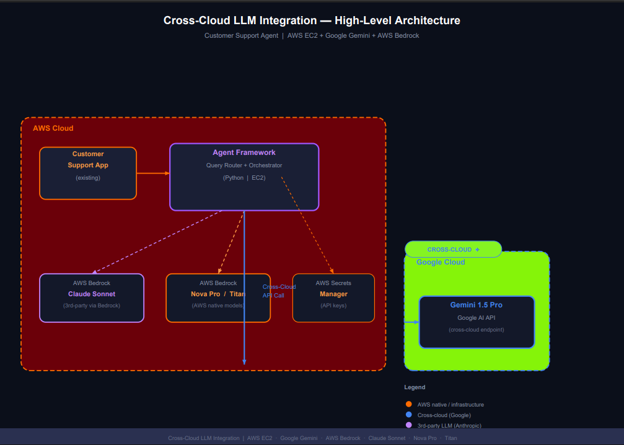
4.2 Architecture Overview
- Existing app: Python-based backend running on EC2
- Agent framework: Custom agent code handling ticket routing and response generation
- LLM: Gemini 1.5 Pro via Google AI API (REST call from EC2 to Google’s endpoint)
- Auth: Google API key stored in AWS Secrets Manager
4.3 How the Integration Works
The key integration point is straightforward – your existing Python code on EC2 calls the Google Generative AI SDK:
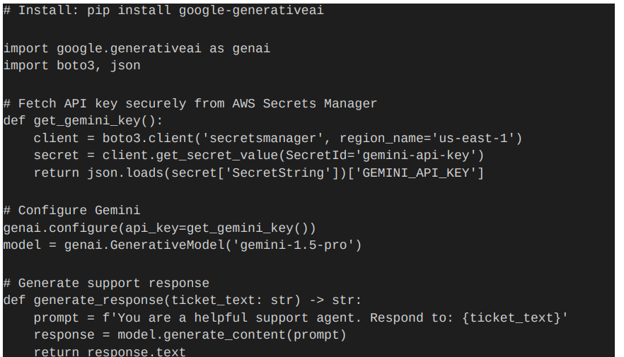
The critical security decision here was using AWS Secrets Manager to store the Google API key — never hardcode cross-cloud credentials in your application code or environment variables directly.
4.4 Lessons Learned
- Latency: Calling Gemini from EC2 adds ~200-400ms network overhead compared to calling AWS Bedrock. For async support workflows, this is perfectly acceptable.
- Cost tracking: Cross-cloud means two billing dashboards. We tracked Gemini token usage separately from AWS costs using structured logging.
- Fallback strategy: We implemented a fallback to a Bedrock model if the Gemini API was unavailable, using a simple retry wrapper — an early version of the LLM fallback and routing strategy we later formalised in Project 2.
5. Project 2 – Multi-Model Agent with Bedrock + Gemini
5.1 The Problem
The second project was more complex – a customer support agent that needed to handle multiple types of queries with different levels of reasoning depth. We used multiple models and routed queries intelligently based on complexity.
5.2 Model Routing Strategy
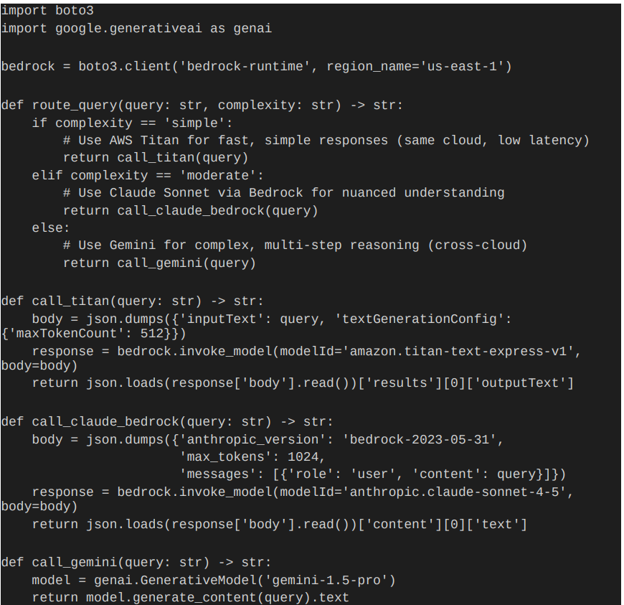
Not every query needs the same model. Here’s the LLM fallback and routing strategy we implemented in our agent framework:
5.3 Why This Multi-Model Approach Works
- Speed vs. capability tradeoff: Titan handles simple FAQs in milliseconds. Gemini handles complex complaints requiring deep reasoning.
- Cost optimisation: Cheaper models handle the high-volume, simple queries. Premium models are reserved for cases that truly need them.
- Resilience: If one provider has an outage, the routing layer can shift traffic to available alternatives.
- Best-of-breed: You’re not locked into one provider’s model quality. You use the right model for each job.
6. Key Challenges & How We Solved Them
Challenge 1: Cross-Cloud Credential Management
With AWS IAM handling Bedrock access and a Google API key for Gemini, credential management becomes critical.
- Store all API keys in AWS Secrets Manager – single source of truth
- Use IAM roles on EC2 instances – no hardcoded AWS credentials needed
- Rotate Google API keys regularly and update Secrets Manager automatically
Challenge 2: Unified Observability
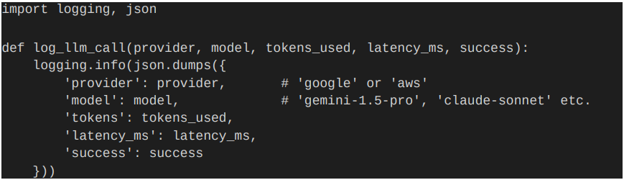
Two cloud providers means two sets of logs and metrics. We unified observability using structured JSON logging and shipped everything to AWS CloudWatch:
Challenge 3: Latency Management
Cross-cloud API calls (EC2 to Google) introduce additional network hops. Our strategies:
- Used async calls for non-blocking Gemini requests where possible
- Set explicit timeouts on all cross-cloud calls (we used 10s timeout for Gemini)
- Implemented circuit breakers – after 3 failed Gemini calls, route to Bedrock fallback
Challenge 4: Prompt Consistency Across Models
Different models respond differently to the same prompt. We built a prompt templating layer:
- Core intent and context defined once
- Model-specific formatting applied at the routing layer
- Output normalised to a standard response schema before returning to the app
7. High-Level Architecture
8. When Should You Go Cross-Cloud?
Cross-cloud LLM integration is not always the right answer. Here’s a practical decision framework:
9. Conclusion
Cross-cloud LLM integration is not a theoretical concept – it’s something real engineering teams are doing today in production systems. Across two customer support projects on AWS, we successfully integrated Google Gemini alongside AWS Bedrock-hosted models (Claude Sonnet, Nova Pro, Titan) into existing agent frameworks running on EC2.
The key takeaways for developers:
- Cross-cloud is straightforward at the code level – an API call is an API call, regardless of which cloud the model lives on
- The real complexity is in credential management, observability, and fallback strategy
- Multi-model routing gives you the best of all providers – not just one vendor’s offerings
- Start with AWS Secrets Manager for credentials, structured logging for observability, and explicit timeouts for reliability
The cloud walls are lower than they appear. The best model for your job might live on a different cloud – and that’s perfectly fine.