Cloud cost management is no longer an operational detail – it’s a leadership issue. With modern architectures spanning multiple clouds, container platforms, and SaaS tools, cloud spending can grow faster than revenue. Without financial governance built in, organizations risk losing control long before the problem shows up in quarterly reviews.
The numbers are hard to ignore: A survey estimates that enterprises waste up to 30% of their cloud spend due to poor cost visibility and lack of financial governance. For large organizations, that’s not pocket change – it translates into crores of annual spend with no clear ownership or governance.
This is where FinOps stops being optional. FinOps tools bring engineering, finance, and business teams onto the same page – one shared view of cloud costs, trade-offs, and accountability. Instead of reacting to surprise bills, teams can forecast spending, spot anomalies early, and optimize continuously without slowing innovation.
Modern FinOps tools for cloud go far beyond spreadsheets. They automate cost allocation, tagging, anomaly detection, budgeting, and optimization across hundreds of services and multiple clouds – turning uncontrolled cloud spend into financial discipline.
In this blog, we’ll break down:
- What are FinOps tools really are?
- Why FinOps tools are essential?
- The capabilities that matter most
- Top FinOps tools to consider (open-source and commercial),
- How to choose the right FinOps tool
- Implement FinOps the Right Way with Rapyder.
Because in today’s cloud world, controlling cost isn’t about spending less. It’s about spending smart.
What Are FinOps Tools?
FinOps tools are platforms and utilities that plug into AWS, Azure, GCP, Kubernetes, and SaaS billing systems to clearly show where every rupee or dollar in cloud spend is going. They convert raw, complex usage data into business-friendly views – like cost per team, product, or customer – rather than limiting insights into individual cloud services.
These tools support FinOps practices by:
- Informing stakeholders with dashboards, reports, and uniteconomics soengineering, finance, and product see the same numbers.
- Optimizingcosts via rightsizing, discount optimization, and cleanup recommendations.
- Operating FinOps at scale with budgets, alerts, workflows, and policy automation embedded into daily engineering work.
Why FinOps Tools Are Essential for Cloud Cost Management in 2026
- Cloud bills are too complex for spreadsheets. Thousands of SKUs across multiple accounts and regions make manual tracking unreliable; FinOps tools normalize this data and surfacetrue cost drivers.
- Multi-cloud and Kubernetes obscure ownership.With workloads spread across AWS, Azure, GCP, and clusters, it’s hard to know who owns what; FinOps tools allocate costs to namespaces, teams, and applications.
- Discount programs need automation.Properly managing Savings Plans, Reserved Instances, and Committed Use Discounts can save 30–70% but is difficult without software that continuously models and adjusts commitments.
- Finance needs predictability, notend-of-the-month surprises. Budgets, forecasts, and anomaly detection in FinOps platforms help teams react before a spike becomes an invoice problem.
- FinOps is cross functional.Tools give engineering and finance shared dashboards and metrics, making cost a team sport rather than a finance-only concern.
Key Capabilities to Look for in FinOps Tools
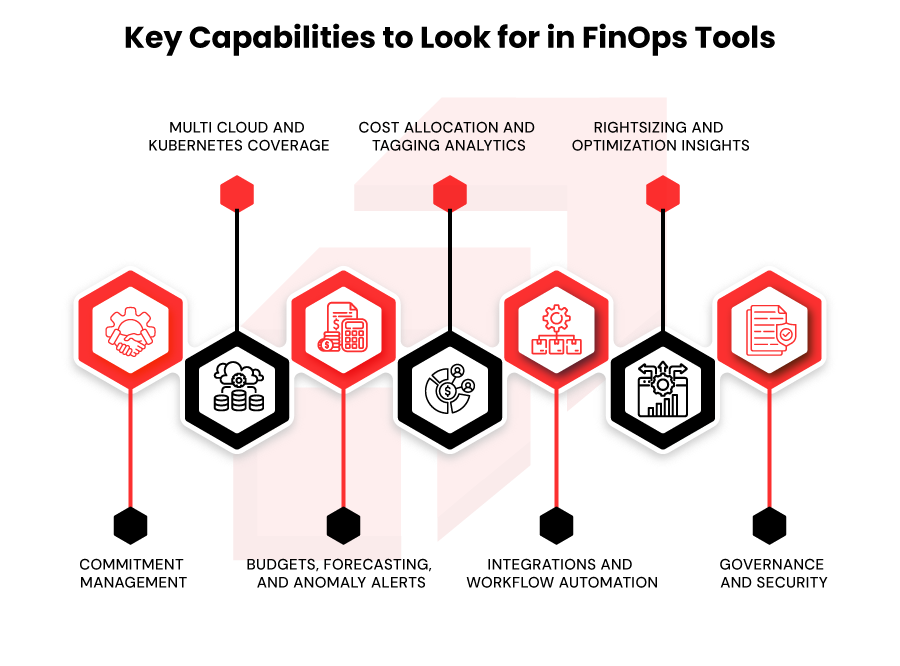
- Multi cloud and Kubernetes coverage:Native connectors for AWS, Azure, GCP, plus Kubernetes and major SaaS/data platforms such as Snowflake or Datadog.
- Cost allocation and tagging analytics:Tag compliance reports, untagged resource detection, and mapping to business dimensions (teams, products, customers) for accurate unit cost.
- Rightsizing and optimization insights: Recommendations to downsize instances, terminate idle resources, use spot instances, and move storage to cheaper tiers, with projected savings.
- Commitment management:Modeling and automated management of RIs, Savings Plans, and CUDs so you maximize discounts without overcommitting.
- Budgets, forecasting, and anomaly alerts:Built in budgets, forecasts, and intelligent alerts when spends deviates from expected trends.
- Integrations and workflow automation:APIs and connectors for CI/CD, Slack, Jira, and ITSM tools to embed FinOps into everyday workflows.
- Governance and security:Role-based access, SSO, audit logs, and policy-as-code controls to enforce consistent cost and governance rules.
“FinOps tools don’t reduce cloud costs by themselves – teams do. The real value of FinOps comes when cost visibility is embedded into engineering decisions, not reviewed after the bill arrives. The right tools simply make those decisions faster, smarter, and repeatable.”
— Rapyder FinOps & Cloud Optimization Team
Best FinOps Tools to Consider in 2026: Paid & Open Source FinOps Tools
Open Source FinOps Tools:
1. Tool Name: OpenCost
Overview
CNCF‑backed, vendor‑neutral open standard for Kubernetes cost allocation that exposes granular K8s spend without lock‑in.
Supported cloud platforms
Kubernetes on any cloud or on‑prem.
Key FinOps capabilities
Kubernetes cost allocation, cost breakdown by namespace/workload/label, multi‑cluster aggregation, integration into FinOps dashboards.
Best suited for
Startups and SMBs running Kubernetes, platform teams in enterprises that want open standards over vendor lock‑in.
| Pros | Cons |
| CNCF‑backed open standard for K8s cost allocation, avoiding vendor lock‑in. | K8s‑only, does not cover full cloud bills. |
| Free and self‑hosted with flexible integration into existing Prometheus/Grafana stacks. | Requires engineering effort to deploy, operate, and connect to broader FinOps reporting. |
2. Kubecost (open‑source core)
Overview
Real‑time Kubernetes cost monitoring down to namespace, workload, and pod level, widely used as a free entry point for K8s FinOps.
Supported cloud platforms
Kubernetes on AWS, Azure, GCP, and on‑prem distributions.
Key FinOps capabilities
K8s cost allocation, showback by namespace/team, basic rightsizing and idle resource detection.
Best suited for
Startups and SMBs with small–mid Kubernetes clusters; platform teams testing K8s FinOps with minimal cost.
| Pros | Cons |
| Mature, battle‑tested K8s cost model with granular allocation. | Core OSS focuses on Kubernetes only, full multi‑cloud view needs the paid edition. |
| Easy to get started for small clusters and integrates with Prometheus. | Can become complex and noisy in very large clusters without tuning. |
3. Infracost
Overview
CLI/CI tool that shows Terraform‑driven cost impact in pull requests, enabling “shift‑FinOps‑left” by tying cost to code review.
Supported cloud platforms
AWS, Azure, GCP.
Key FinOps capabilities
Pre‑deploy cost estimates in PRs, cost diff between plans, CI integrations, SaaS add‑on for best‑practice suggestions.
Best suited for
Startups, SMBs, and engineering‑led teams that are Terraform‑first and want developers to own cost.
| Pros | Cons |
| Brings cost visibility directly into Git/CI workflows, driving better engineering decisions. | Focuses on estimates at plan time, not full historical spend analytics. |
| Open source core with simple CLI usage and many CI integrations. | Strongest for Terraform, other IaC types have more limited coverage. |
4. Cloud Custodian
Overview
Policy‑as‑code engine that automates cleanup, tagging, and cost controls across AWS, Azure, GCP using YAML policies.
Supported cloud platforms
AWS, Azure, GCP and some SaaS integrations.
Key FinOps capabilities
Automated cleanup of unused resources, tag enforcement, scheduling/rightsizing actions, multi‑cloud governance policies.
Best suited for
DevOps/SRE teams (SMB to enterprise) comfortable with YAML and automation.
| Pros | Cons |
| Powerful, flexible policy‑as‑code engine for automated cost controls across clouds. | Steeper learning curve, requires good YAML and cloud API understanding. |
| Open source with strong community and FinOps adoption. | No native visual dashboards; usually paired with other reporting tools. |
5. OptScale
Overview
Open‑source multi‑cloud FinOps platform from Hystax featuring cost dashboards, idle resource detection, and cost optimization.
Supported cloud platforms
AWS, Azure, GCP and some DB/ML workloads such as Databricks.
Key FinOps capabilities
Idle resource detection, RI/Savings Plans optimization, rightsizing, power schedules, multi‑cloud dashboards.
Best suited for
Cost‑conscious SMBs or engineering teams that want open‑source multi‑cloud FinOps and can self‑manage the stack
| Pros | Cons |
| Open‑source multi‑cloud FinOps with rich optimization features. | Self‑hosting adds operational overhead. |
| Supports advanced cases like Databricks cost control and power schedules. | UX and polish may lag behind newer commercial SaaS tools. |
6. AWS Cost Explorer
Overview
Native AWS tool for visualizing, analyzing, and forecasting AWS costs and usage, with tagging, filtering, and basic RI/Savings Plans recommendations at no extra charge.
Supported cloud platforms
AWS only.
Key FinOps capabilities
Historical and forecasted cost views, filtering by tag/account/service, resource‑level granularity, exportable reports, RI/SP insights.
Best suited for
Startups and SMBs that are AWS‑only or just starting their FinOps journey
| Pros | Cons |
| Free, native, and tightly integrated with AWS billing and tagging. | Limited unit‑economics or business mapping. |
| Good filtering, grouping, and basic forecasting for day‑one FinOps. | Single‑cloud; not suitable for serious multi‑cloud or SaaS cost aggregation. |
7. Azure Cost Management + Billing
Overview
Native Azure toolkit for analytics, budgets, and cost controls, integrated with billing and Power BI for flexible reporting.
Supported cloud platforms
Azure primarily, with limited support for some external providers via connectors.
Key FinOps capabilities
Cost analysis and allocation, budgets and alerts, export to Power BI, Azure Advisor cost recommendations.
Best suited for
Microsoft‑centric SMBs and enterprises running mostly on Azure.
| Pros | Cons |
| Deep Azure integration with easy access from subscriptions and management groups. | Cross‑cloud visibility and advanced unit‑economics are limited. |
| Built‑in budgets, alerts, and Power BI exports for flexible reporting. | Complex billing constructs can be hard to model for very large orgs. |
8. GCP Billing & Cost Management (native)
Overview
Google Cloud’s native billing reports, budgets, and cost breakdowns by project, service, and SKU, with BigQuery export for custom modeling.
Supported cloud platforms
GCP only.
Key FinOps capabilities
Budgets and alerts, project/service‑level breakdowns, forecasting in billing reports, export to BigQuery for custom FinOps modeling.
Best suited for
GCP‑first startups, data/ML teams, and organisations centralising workloads on Google Cloud.
| Pros | Cons |
| Native, no‑cost entry point with budgets and detailed billing breakdowns. | Lacks advanced automated optimization and rich business‑level unit economics out of the box. |
| Easy BigQuery export enabling powerful custom FinOps analytics. | Single‑cloud, multi‑cloud and SaaS costs require external tools. |
9. Cloudchipr (free tier)
Overview
SaaS FinOps tool offering free basic multi‑cloud cost analytics and rightsizing recommendations, with paid tiers for deeper automation.
Supported cloud platforms
AWS, Azure, GCP (multi‑cloud).
Key FinOps capabilities
Cost dashboards, idle/underutilized resource detection, rightsizing suggestions, basic anomaly alerts.
Best suited for
SMBs and startups wanting more usability than native consoles but not yet ready for heavy enterprise FinOps platforms.
| Pros | Cons |
| Simple, opinionated UI that improves on raw cloud consoles for smaller teams. | Free tier is feature and scale‑limited, serious FinOps needs a paid plan. |
| Multi‑cloud view with actionable rightsizing guidance. | Less depth than specialist platforms on unit economics or automation. |
10. Turbo360 (community/entry tier)
Overview
Azure‑focused observability and FinOps tool providing cost dashboards and alerts beyond native Azure Portal.
Supported cloud platforms
Azure‑focused, with primary support for Azure services.
Key FinOps capabilities
Azure cost dashboards, budgeting/alerts, resource grouping by business context, some optimization insights.
Best suited for
SMBs and teams heavily invested in Azure that want friendlier FinOps/observability than Azure Portal alone.
| Pros | Cons |
| Azure‑specialised UX that aligns with how Azure workloads are actually built. | Limited or no first‑class support for non‑Azure clouds. |
| Community/entry tiers lower the barrier to entry for Azure FinOps. | Still needs native Azure Cost Management for full billing and governance depth. |
Paid FinOps Tools
1. Finout
Overview
Multi‑source FinOps platform aggregating cloud and SaaS spend and mapping it to business units, products, customers, and features via unit‑economics dashboards.
Supported cloud platforms
AWS, Azure, GCP plus many SaaS and data tools.
Key FinOps capabilities
Cost aggregation across providers, unit cost per customer/feature, business mapping, anomaly detection, and dashboards for finance + engineering.
Best suited for
Scale‑ups and enterprises wanting deep unit economics and cost‑per‑customer/product views.
| Pros | Cons |
| Strong unit‑economics modelling. | Can be more than small teams need and requires initial modeling effort. |
| Aggregates cloud + SaaS into one business‑level FinOps view. | Enterprise‑oriented pricing may be high for early‑stage startups. |
2. CloudZero
Overview
FinOps platform focused on cloud cost intelligence and unit economics, aligning engineering and finance around cost per customer, product, or feature.
Supported cloud platforms
Primarily AWS, with support for other clouds and Kubernetes via integrations.
Key FinOps capabilities
100% cost allocation, unit cost dashboards, Kubernetes cost allocation, budgets and anomaly alerts, advisory FinOps support.
Best suited for
SaaS and product‑led companies (SMB to enterprise) that want engineers to own cost, especially on AWS.
| Pros | Cons |
| Strong unit‑economics and engineer‑friendly cost views drive accountability. | Requires good tagging/telemetry hygiene to achieve 100% allocation. |
| Usage‑based pricing. | Primarily optimised around AWS, multi‑cloud features are evolving. |
3. Apptio Cloudability
Overview
Mature enterprise FinOps platform (now Apptio) offering multi‑cloud cost allocation, budgeting, showback/chargeback, and governance.
Supported cloud platforms
AWS, Azure, GCP, plus hybrid/on‑prem via integrations.
Key FinOps capabilities
Detailed cost allocation, budgets and forecasts, showback/chargeback, policy‑driven governance, enterprise reporting.
Best suited for
Large enterprises with complex org structures and formal governance needs.
| Pros | Cons |
| Deep enterprise features for budgeting, chargeback, and executive reporting. | Heavier implementation and learning curve compared to lighter SaaS tools. |
| Proven in large, multi‑cloud, regulated environments. | Typically enterprise‑priced and likely overkill for small teams. |
4. VMware CloudHealth
Overview
Cloud management suite combining cost optimization, governance, and security insights across major clouds, now under VMware.
Supported cloud platforms
AWS, Azure, GCP, plus strong integration with VMware and hybrid environments.
Key FinOps capabilities
Cost visibility, rightsizing, policies, governance reporting, security/compliance overlays.
Best suited for
Enterprises with significant VMware/hybrid footprints and multi‑cloud estates.
| Pros | Cons |
| Strong for organisations bridging VMware data centers and public clouds. | UI and workflows can feel heavy compared to newer FinOps‑only tools. |
| Combines cost, governance, and some security insights in one platform. | Often targeted at larger enterprises; pricing and complexity reflect that. |
5. Holori
Overview
Cloud architecture + FinOps tool that lets teams visually design, compare, and cost multi‑cloud topologies before deploying.
Supported cloud platforms
AWS, Azure, GCP (reference pricing and templates).
Key FinOps capabilities
Visual architecture diagrams with price comparison, what‑if scenarios, provider comparisons, exportable designs.
Best suited for
Cloud architects and platform teams planning or re‑platforming complex environments
| Pros | Cons |
| Great for pre‑deployment design and cost comparison between providers. | Less focus on ongoing operational FinOps and anomaly detection. |
| Visual, architect‑friendly interface aids communication with stakeholders. | Still needs separate tooling for day‑2 optimization and governance. |
6. nOps
Overview
AWS‑focused FinOps platform with strong automation around rightsizing, RI/Savings Plans, and continuous optimization, often with savings‑based pricing.
Supported cloud platforms
Primarily AWS.
Key FinOps capabilities
Automated RI/SP recommendations and execution, rightsizing, anomaly alerts, Well‑Architected review support.
Best suited for
AWS‑heavy environments (SMB to enterprise) that want hands‑off commitment and rightsizing optimization.
| Pros | Cons |
| Deep AWS expertise and strong automation around commitments and rightsizing. | Limited beyond AWS; not ideal for multi‑cloud portfolios. |
| Savings‑based pricing aligns vendor incentives with realized savings. | Requires customers to be comfortable delegating RI/SP decisions. |
7. Flexera One with Spot
Overview
Combines IT asset management/FinOps with Spot by NetApp’s automated spot‑instance and commitment optimization.
Supported cloud platforms
AWS, Azure, GCP and on‑prem assets via Flexera’s asset management.
Key FinOps capabilities
Cost visibility, license and asset management, automated spot usage and rightsizing, RI/SP optimization via Spot.
Best suited for
Large enterprises needing a broad asset + cost management suite, not just cloud bills.
| Pros | Cons |
| Unifies traditional ITAM with cloud FinOps and spot automation. | Pricing and complexity oriented to large enterprises, not SMBs. |
| Spot automation can deliver strong savings on elastic workloads. | Implementation can be heavy and require cross‑team coordination. |
8. ProsperOps
Overview
Specialised AWS service that fully automates RI and Savings Plan portfolio management using performance‑based pricing.
Supported cloud platforms
AWS only.
Key FinOps capabilities
Automated purchase/adjustment of RIs and Savings Plans, continuous coverage optimization, performance‑based fee model.
Best suited for
Organisations with large, steady AWS spend that want to outsource commitment optimization.
| Pros | Cons |
| Hands‑off, expert‑level RI/SP management often delivering significant savings. | Very AWS‑specific, doesn’t address broader FinOps. |
| Performance‑based pricing aligns cost with realized optimization value. | Best suited to larger, stable workloads; less value for highly volatile usage. |
9. Vantage
Overview
Modern cloud cost management tool with clean UI, multi‑cloud dashboards, budgets, and anomaly alerts, focused on fast, clear insights.
Supported cloud platforms
AWS, Azure, GCP and some SaaS/data platforms via integrations.
Key FinOps capabilities
Unified cost dashboards, budgets and alerts, anomaly detection, team‑level views.
Best suited for
Startups, SMBs, and mid‑market teams that want quick time‑to‑value and visually clear cost reporting.
| Pros | Cons |
| Very clean, intuitive UX with quick onboarding and clear dashboards. | Less opinionated on deep unit‑economics vs tools like CloudZero/Finout. |
| Multi‑cloud view with budgets and anomaly alerts out of the box. | Advanced governance/showback features may lag enterprise incumbents. |
10. Datadog Cloud Cost Management
Overview
Cost analytics module inside Datadog that correlates infrastructure performance metrics with cloud spend.
Supported cloud platforms
AWS, Azure, GCP (via Datadog billing integrations), plus K8s and services monitored by Datadog.
Key FinOps capabilities
Cost dashboards tied to performance metrics, cost per service/team, anomaly detection, budgets/alerts in the same place as observability.
Best suited for
SRE and platform teams already standardized on Datadog for monitoring and logs.
| Pros | Cons |
| Puts cost and performance in one place, ideal for SRE/operations workflows. | Best value only if you are already a Datadog customer. |
| Good for understanding “cost of performance” per service or environment. | Less focused on financial processes vs pure FinOps tools. |
How to Choose the Right FinOps Tool for Your Organization
- Match your cloud footprint – Ensure the tool supports all major clouds, Kubernetes, and key SaaS/data platforms you rely on.
- Align with FinOps maturity – Early-stage teams might layer a light SaaS on top of native tools; mature organizations often need advanced allocation, unit economics, and automation.
- Prioritiseadoption and UX – If engineers and finance do not actually use the tool, you will not get value intuitive dashboards and clear recommendations.
- Check integration ecosystem – Look for connectors to CI/CD, Slack, Jira, ITSM, and data warehouses so insights feed existing workflows.
- Evaluate governance and security – RBAC, SSO, audit logs, and data residency should meet your security and compliance standards.
- Assess pricing versus expected savings – Evaluate pricing against the savings you expect to achieve. Estimate potential cost reductions and favor tools with scalable or savings-based pricing if your cloud spend is large or growing quickly.
Common Mistakes Teams Make When Adopting FinOps Tools
- Starting with tools instead ofobjectives – Teams jump into vendor demos without defining clear goals such as reducing idle spending or improving forecasting accuracy.
- Running FinOps from finance alone – If engineering is not engaged, recommendations never get implemented and tools become “expense policing” dashboards.
- Sticking to native consoles for complex estates – Native AWS/Azure/GCP tools are fine early on but struggle with multi-cloud, Kubernetes, and SaaS costs at scale.
- Ignoring tagging and data quality – Without consistent tagging and account structure, even the best FinOps platform cannotallocate costs correctly.
- Expecting tools to replace FinOps culture – Software surfaces insights, but savings only come when teams change behaviors, budgets, and engineering practices.
Implement FinOps the Right Way with Rapyder
Rapyder combines FinOps expertise with the right tools, so you’re not left figuring it all out on your own. Its Cloud FinOps Services and Tech Studio FinOps Cost Intelligence Dashboard are built for AWS, transforming raw billing data into clear, role-specific insights that drive action.
Key benefits include:
- Comprehensive visibility: Unified view of AWS accounts, services, and business units so leaders know exactly where money goes.
- Actionable optimization: Identification of waste (idle resources, overprovisioned instances) and structured plans for rightsizing, discounts, and architectural improvements.
- Ongoing governance: FinOps processes, reporting cadences, and automation that keep savings sustainable instead of one-off.
Get Your Free Cloud FinOps Assessment →
Conclusion
FinOps tools take cloud cost management from reactive spreadsheets to proactive, data-driven decision making. The right mix of open-source utilities, native consoles, and dedicated FinOps platforms gives your teams real-time visibility, intelligent optimization, and shared accountability for spend.
Start with your goals and cloud environment, then pick tools that your engineers and finance teams will use – and consider partnering with specialists like Rapyder to accelerate your FinOps journey. When culture, process, and tools come together, cloud costs stop being a surprise and start becoming a lever for growth.