Healthcare, insurance, and healthtech organizations are generating more sensitive data than ever before; and much of it now lives in the cloud. According to industry studies, healthcare data breaches cost organizations millions per incident, making compliance a business-critical requirement, not just a legal one. As more workloads move to AWS, questions around AWS HIPAA compliance are becoming increasingly common.
HIPAA sets strict standards for how protected health information (PHI) is stored, processed, and accessed. This guide breaks down what HIPAA really means, why it matters for cloud workloads, and how organizations can build and maintain HIPAA-compliant environments on AWS.
We’ll also walk through a practical checklist and step-by-step process used by teams like Rapyder to help customers stay compliant.
What Is HIPAA?
HIPAA, or the Health Insurance Portability and Accountability Act, is a U.S. regulation designed to protect Protected Health Information (PHI). PHI includes any data that can identify an individual and is related to their health condition, treatment, or payment information.
This covers everything from medical records and insurance details to appointment data and diagnostic reports. HIPAA applies to healthcare providers, insurers, healthtech platforms, and any organization handling PHI, whether data is stored on-premises or in the cloud.
Why HIPAA Matters for Cloud Workloads
When organizations move healthcare workloads to the cloud, HIPAA doesn’t disappear, it becomes more complex. Here’s why HIPAA is critical for cloud environments:
- Shared Responsibility Model
AWS secures the infrastructure, but customers are responsible for securing data, access, and configurations.
- Increased Attack Surface
Cloud environments introduce APIs, IAM roles, and distributed services that must be tightly controlled.
- Strict Regulatory Penalties
HIPAA violations can result in heavy fines, legal consequences, and reputational damage.
- Patient Trust
Healthcare data breaches erode trust and impact long-term business viability.
- Audit and Reporting Requirements
HIPAA mandates logging, monitoring, and incident response capabilities.
AWS provides a strong foundation for compliance, but HIPAA compliance on AWS requires deliberate architecture and governance decisions.
AWS HIPAA Compliance Requirements (Simplified)
HIPAA requirements fall into three major safeguard categories. Understanding these is essential before building a compliant AWS environment.
Administrative Safeguards
Administrative safeguards focus on policies, procedures, and people.
- Risk assessments and risk management programs
- Workforce training and access controls
- Incident response planning and breach notification
- Business Associate Agreements (BAA) with AWS
AWS signs a HIPAA BAA for eligible services, which is a foundational requirement.
Physical Safeguards
Physical safeguards protect infrastructure and physical access.
- Secure AWS data centers with restricted access
- Hardware lifecycle management
- Disaster recovery and availability planning
AWS manages physical security of data centers, which significantly reduces the burden on customers.
Technical Safeguards
Technical safeguards are where most cloud responsibility lies.
- Access control using IAM and least privilege
- Encryption of PHI at rest and in transit
- Audit logging and monitoring
- Integrity controls to prevent unauthorized data changes
AWS details technical safeguards in its HIPAA whitepapers and compliance documentation.
AWS HIPAA Compliance Checklist
Below is a practical AWS HIPAA compliance checklist commonly used by consulting teams like Rapyder to assess readiness.
- Sign the BAA (Non-Negotiable)
Before anything else, execute a Business Associate Agreement (BAA) with AWS.
No BAA = no HIPAA conversation. Period.
Why it matters:
It legally confirms AWS will safeguard PHI within the services covered under the agreement.
- Use Only HIPAA-Eligible AWS Services
Not every AWS service is HIPAA-eligible – even if it’s secure.
Checklist mindset:
- Stick strictly to AWS services explicitly covered under the BAA
- Review service eligibility before architecture design, not after go-live
This prevents accidental PHI exposure via unsupported services.
- Encrypt Everything
HIPAA doesn’t “suggest” encryption. Auditors expect it.
Best practices:
- Enable encryption at rest (S3, EBS, RDS, backups)
- Enforce TLS for data in transit
- Use AWS KMS with tight key policies and rotation
Simple rule:
If data exists → it’s encrypted.
- Lock Down Access (IAM Discipline)
Over-permissioned access is the fastest way to fail an audit.
Checklist essentials:
- Least-privilege IAM roles
- MFA for all privileged users
- No shared credentials
- Regular access reviews
If everyone can see PHI, compliance is already broken.
- Enable Logging, Monitoring & Audit Trails
HIPAA doesn’t trust assumptions – it expects proof.
You should be able to answer:
- Who accessed PHI?
- When?
- From where?
- What did they do?
AWS controls to enable:
- CloudTrail (API activity)
- CloudWatch (alerts & monitoring)
- Centralized, immutable log storage
Logs aren’t optional – they’re your defense.
- Secure the Network Boundary
Assume the internet is hostile (because it is).
Checklist basics:
- Private subnets for PHI workloads
- Tight Security Groups and NACLs
- No public exposure unless absolutely required
- Use WAF where applicable
If it doesn’t need to be public, it shouldn’t be.
- Backups, DR & Data Retention
HIPAA cares about availability, not just security.
Ensure:
- Automated, encrypted backups
- Defined RPO and RTO
- Tested disaster recovery plans
- Clear data retention and deletion policies
A compliant system that can’t recover is still non-compliant.
- Incident Response Readiness
Breaches aren’t “if,” they’re “when.”
You need:
- A documented incident response plan
- Clear escalation paths
- Regular security drills
- Alignment with AWS shared responsibility model
Speed and clarity matter more than perfection.
- Continuous Risk Assessment
HIPAA compliance is ongoing – not annual.
Checklist habit:
- Regular vulnerability scans
- Periodic architecture reviews
- Policy updates as systems evolve
Cloud changes fast. Compliance must keep up.
The mindset that works
AWS handles security of the cloud. You’re responsible for security in the cloud.
Treat HIPAA like a formality and it shows during audits. Build it into how systems run, and compliance becomes routine – not stressful.
How to Make AWS Service HIPAA Compliant (Step-by-Step Process)
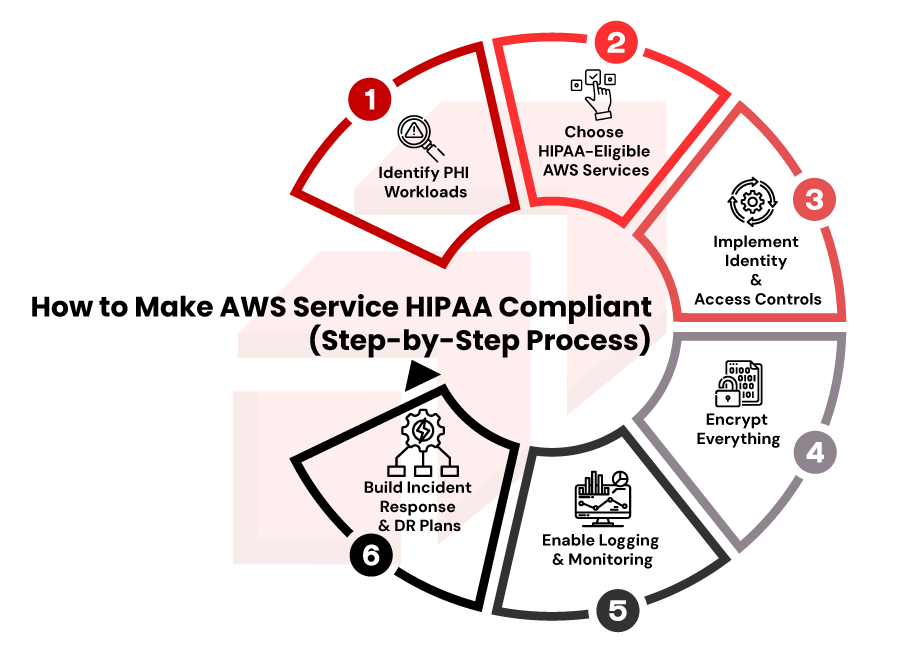
Organizations often ask how to make AWS services HIPAA compliant. Here’s a simplified step-by-step approach we used at rapyder
Step 1: Identify PHI Workloads
Classify workloads that store, process, or transmit PHI. Not all applications require HIPAA controls.
Step 2: Choose HIPAA-Eligible AWS Services
AWS publishes a list of services covered under its HIPAA BAA. Avoid using non-eligible services for PHI workloads.
Step 3: Implement Identity & Access Controls
Use IAM roles, MFA, and role-based access. Limit access strictly to authorized users.
Step 4: Encrypt Everything
Use AWS KMS for encryption at rest and enforce TLS for data in transit.
Step 5: Enable Logging & Monitoring
CloudTrail, CloudWatch, and AWS Config are critical for audits and incident investigations.
Step 6: Build Incident Response & DR Plans
HIPAA requires documented response procedures and data recovery strategies.
Expert Insight from Rapyder
“Most HIPAA failures on AWS aren’t due to lack of tools; they’re due to misconfiguration. Continuous monitoring and governance matter more than one-time setup.”
— Cloud Security Architect, Rapyder
Best Practices to Maintain Continuous HIPAA Compliance on AWS
HIPAA compliance is not a one-time activity. Best practices include:
- Continuous configuration monitoring
- Regular access reviews
- Automated compliance checks
- Periodic penetration testing
- Ongoing workforce training
- Strong change management controls
AWS recommends aligning HIPAA workloads with the AWS Well-Architected Framework – Security Pillar.
Common Mistakes That Lead to HIPAA Violations
Some of the most common HIPAA violations on AWS include:
- Using non-HIPAA-eligible AWS services
- Over-permissive IAM roles
- Missing encryption configurations
- Inadequate logging and monitoring
- Poor incident response preparation
- Assuming AWS handles full compliance
Avoiding these mistakes significantly reduces audit and breach risks.
How Rapyder Helps You Achieve AWS HIPAA Compliance
Rapyder has helped healthcare and healthtech organizations design, assess, and operate HIPAA-compliant AWS environments aligned with regulatory and security best practices. Rather than applying generic templates, Rapyder focuses on understanding data flows, compliance scope, and operational maturity.
From HIPAA readiness assessments and architecture reviews to continuous compliance monitoring and audit preparation, Rapyder supports organizations at every stage of their compliance journey, without disrupting innovation or agility.
Get in touch with us today!