AWS ECS vs EKS represents one of the most critical decisions facing organizations adopting container orchestration on the AWS cloud.
Amazon Elastic Container Service (ECS) and Amazon Elastic Kubernetes Service (EKS) are both managed container services offered by AWS, yet they serve fundamentally different architectural philosophies and operational approaches.
Understanding which AWS container services align with your organization’s needs directly impacts cost, scalability, and long-term flexibility.
This comparison addresses the core question: should you choose AWS’s proprietary container orchestration solution or embrace the industry-standard Kubernetes ecosystem within AWS’s managed infrastructure?
Understanding AWS Container Orchestration
Container orchestration automates the deployment, scaling, networking, and management of containerized applications across clusters of machines. This automation handles complex tasks like service discovery, load balancing, rolling updates, and failure recovery that would otherwise require extensive manual intervention. These services are used to manage containers at scale, simplifying operations in large, automated environments.
AWS offers multiple container orchestration options because different workloads demand different levels of control, complexity, and integration. Organizations may prioritize rapid deployment and AWS ecosystem integration over portability or require industry-standard Kubernetes compatibility for multi-cloud strategies. AWS services support running containers on both EC2 and Fargate, providing flexibility for various deployment needs.
The AWS platform provides seamless integration between its container services and other AWS services like AWS CloudWatch, AWS IAM, and elastic load balancer, while supporting both traditional EC2 infrastructure and serverless AWS Fargate deployments. Containers can be deployed on virtual machines with EC2 or on serverless infrastructure with Fargate.
Both ECS and EKS are offered as fully managed services by AWS, allowing users to focus on their applications rather than managing the underlying orchestration platform.
What is Amazon Elastic Container Service (ECS)
AWS Elastic Container Service (ECS) is AWS’s proprietary container orchestration service designed for simplicity and deep integration with the AWS ecosystem. AWS Elastic Container Service manages containerized applications using AWS-native concepts without requiring Kubernetes expertise.
Key ECS concepts include ECS clusters (logical groupings of compute resources that are easy to maintain), ECS services (responsible for running and maintaining a specified number of container instances), tasks (individual container instances), and task definitions (blueprints specifying container configuration). This proprietary AWS product abstracts away infrastructure complexity while maintaining fine grained control over resource allocation.
ECS architecture is built around core components such as clusters, services, and tasks, supporting scalability and security for deploying containerized applications. Recent updates continue to enhance its operational efficiency and integration with other AWS services.
ECS launch types support both EC2 (where you manage underlying infrastructure) and AWS fargate (serverless container deployments). This flexibility allows teams to choose between managing servers themselves or letting AWS manage the underlying infrastructure completely.
Relationship to container orchestration: ECS simplifies container management by eliminating the need to learn Kubernetes while providing robust orchestration capabilities through familiar AWS tools and AWS management console interfaces. ECS makes it easy to deploy, schedule, and manage containerized applications, streamlining operations and integration with other AWS services.
What is Amazon Elastic Kubernetes Service (EKS)
AWS Elastic Kubernetes Service (EKS) is AWS’s managed Kubernetes service that runs upstream Kubernetes on AWS infrastructure. EKS provides a managed Kubernetes control plane while giving access to the full Kubernetes ecosystem and Kubernetes API.
Core Kubernetes concepts in EKS include pods (smallest deployable units), deployments (declarative application management), services (network access to pods), and namespaces (cluster resource isolation).
EKS manages individual containers within pods, allowing fine-grained control and flexibility in your cluster. EKS also supports features like the Horizontal Pod Autoscaler, enabling responsive scaling of workloads based on resource utilization. These standard Kubernetes primitives ensure compatibility with the broader Kubernetes ecosystem and third-party tools.
AWS takes care of the entire Kubernetes control plane for EKS – spreading it across multiple Availability Zones and managing everything from the API server to etcd and controller processes. Your team only focuses on the worker side, whether that’s running nodes on EC2 or going fully serverless with Fargate.
Building on container orchestration: EKS provides Kubernetes-standard orchestration while integrating with AWS services, offering both the flexibility of open-source Kubernetes and the reliability of AWS managed service infrastructure.
Key Differences Between ECS and EKS
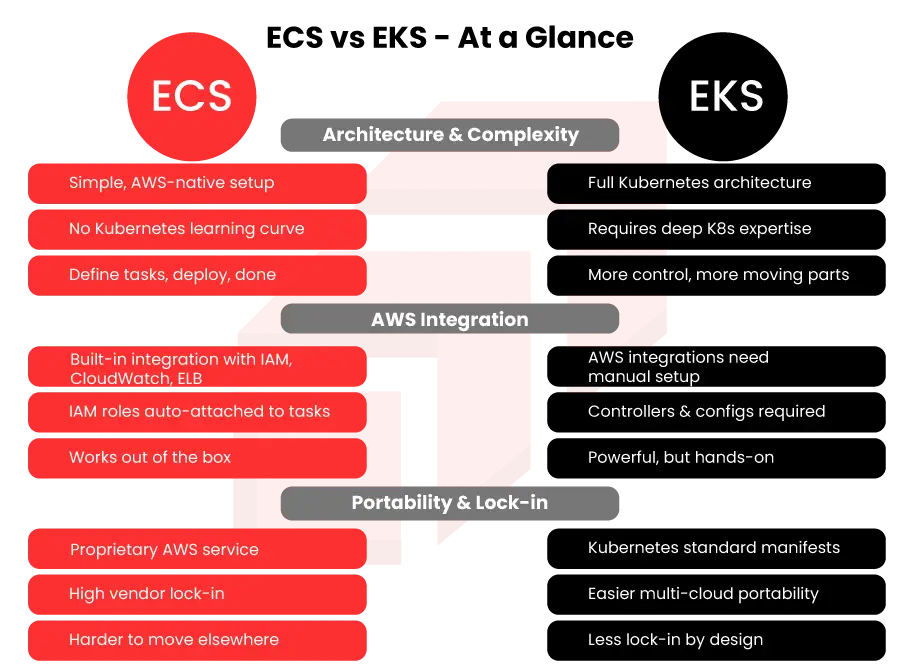
This section provides a high-level EKS vs ECS comparison to help you understand the key differences between these AWS container services. The fundamental distinction between these AWS container services lies in their architectural approaches: ECS prioritizes AWS-native simplicity while EKS embraces Kubernetes standards and ecosystem compatibility.
- Architecture and Complexity
ECS uses proprietary AWS APIs and simplified abstractions that hide much of the underlying infrastructure complexity. Teams can deploy containerized applications without learning Kubernetes concepts, using familiar AWS tools and straightforward task definitions. This proprietary AWS product requires minimal operational overhead beyond basic AWS knowledge.
EKS implements standard Kubernetes architecture with all its complexity and power. Teams must understand pods, deployments, services, and other Kubernetes primitives. While this requires manual configuration and deeper expertise, it provides access to the vast kubernetes ecosystem including Helm charts, operators, and custom resource definitions.
- AWS Integration and Ecosystem
Native AWS integration heavily favors ECS with seamless connections to AWS cloudwatch, AWS iam, elastic load balancer, and other AWS services through pre configured servers and deep integration. ECS tasks automatically inherit AWS iam roles and integrate with AWS security configurations without additional setup.
EKS requires manual configuration for many AWS integrations, though it supports the same AWS services through Kubernetes-specific implementations. Teams must configure AWS Load Balancer Controller, AWS IAM roles for service accounts, and other integration components that ECS provides automatically.
- Portability and Vendor Lock-in
ECS creates significant vendor lock-in through its proprietary task definitions, service configurations, and AWS-specific APIs. Migrating containerized workloads from ECS to other platforms requires complete rearchitecture of orchestration logic.
EKS maintains workload portability through standard Kubernetes manifests that can run on any kubernetes cluster with minimal modification. While AWS-specific integrations still create some lock-in, the core application definitions remain portable across cloud providers.
Use Cases for Container Services
- AWS ECS is ideal for simple web applications and microservices with minimal operational overhead.
- ECS offers deep integration with the AWS ecosystem, simplifying management for development-focused teams.
- AWS EKS suits complex, distributed systems requiring fine-grained control, advanced networking, and scalability.
- EKS is well-suited for microservices architectures, batch processing, and machine learning workloads.
- ECS enables quick deployment of containerized applications with seamless AWS integration.
- EKS provides full Kubernetes power and ecosystem access for sophisticated, scalable platforms.
- Both ECS and EKS support efficient deployment, management, and scaling of containerized workloads in AWS cloud.
Detailed Comparison and Decision Framework
Choosing between ECS and EKS requires systematic evaluation of technical requirements, team capabilities, cost sensitivity, and strategic goals rather than following general recommendations.
Step-by-Step: Choosing Between ECS and EKS
When to use this framework: Teams evaluating AWS container services for new projects or migrating existing containerized workloads to AWS infrastructure.
Assess Team Expertise: Evaluate existing Kubernetes knowledge and willingness to invest in training. Teams with limited container orchestration experience benefit from ECS simplicity, while Kubernetes-experienced teams can leverage EKS immediately.
Evaluate Workload Complexity: Simple stateless applications align with ECS capabilities,
while complex stateful workloads, microservices requiring advanced networking, or applications needing custom controllers favor EKS flexibility.
Consider Long-term Strategy: Organizations committed to AWS ecosystem can maximize ECS benefits, while those requiring multi-cloud flexibility, regulatory compliance across providers, or future platform independence should choose EKS.
Analyze Cost Requirements: Calculate total costs including EKS’s monthly control plane fees per cluster, operational overhead, and training investments. ECS eliminates control plane costs but may require more AWS resources for equivalent functionality.
Comparison: ECS vs EKS Feature Matrix
| Feature | ECS | EKS |
| Learning Curve | Low – AWS-native concepts | High – Requires Kubernetes expertise |
| Cost Structure | No control plane fees | Control plane cost applies |
| Portability | AWS-only, significant lock-in | High – Standard Kubernetes |
| AWS Integration | Deep integration, automatic | Manual configuration required |
| Ecosystem Support | AWS tools + limited third-party | Full kubernetes ecosystem |
| Maintenance Overhead | Minimal operational burden | Requires ongoing cluster management |
ECS excels for AWS-committed teams prioritizing simplicity and cost efficiency, while EKS serves organizations requiring Kubernetes compatibility, advanced orchestration features, or multi-cloud flexibility. The choice fundamentally depends on whether you value AWS-native simplicity over industry-standard portability.
Transition: Understanding these differences provides foundation for addressing common implementation challenges both services present.
Future of Container Services
AWS container services are evolving rapidly. Serverless deployments via AWS Fargate now let teams run containers without managing infrastructure, focusing entirely on application development. Meanwhile, Kubernetes adoption continues accelerating, with AWS EKS enabling seamless cluster management across cloud, hybrid, and on-premises environments.
Looking ahead, deeper integrations between container services and AWS tools – IAM for access control, CloudWatch for monitoring, and Elastic Load Balancer for traffic distribution – will become more powerful and automated. As AWS enhances ECS, EKS, and Fargate, expect improvements in automation, security, and operational efficiency.
Conclusion and Next Steps
The ECS vs EKS decision hinges on balancing immediate operational simplicity against long-term flexibility and ecosystem access. Choose amazon ECS when prioritizing rapid deployment, cost minimization, and deep AWS integration with limited portability requirements. Select amazon EKS when requiring Kubernetes compatibility, advanced orchestration features, or multi-cloud flexibility despite higher complexity and costs.
To get started:
Evaluate current workloads using the decision framework from rapyder solutions architect to determine complexity requirements and portability needs
Plan pilot implementations starting with non-critical applications to validate operational approaches and cost models.